

Record every session clearly
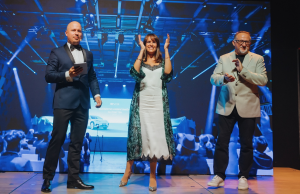
The first step is to make recordings. The sound should be clear; the speaker should be easy to see. The lighting should be bright and balanced enough that the speaker’s face remains clearly visible. For example, people may stop watching if the audio is poor. Clear sound and a steady picture make the video much easier to watch. Because of this, check the recording setup before the event starts. Conference teams should make sure that the equipment works properly and that the video production team understands how to record each session. A short technical test before the event can help prevent recording problems.
Share full session videos
People who live far away may not be able to attend the conference. Some people are busy with their jobs, and others do not have much money to travel. After the conference, the organisers can post the talk videos on the website or on YouTube. This way, more people can watch the conference talks later. This way, the conference can reach more people.
The folks who put the conference together can also add captions to the videos, so people who are deaf or hard of hearing can read what is being said. They can also add translations to the videos so people who speak different languages can understand what is being said.
Make short video clips
Not everyone has time to watch a video. Many people will watch a short clip that shares one practical tip or important lesson. Conference teams can break a talk into videos, and each clip can focus on one practical tip, one clear answer to an important question, or one main lesson from the session. For example, one 40-minute talk may produce five to ten short video clips. These clips can be shared on LinkedIn, Instagram, Facebook, and YouTube Shorts. Conference teams can also use these clips to promote the conference and encourage attendance.
Turn talks into blog posts
Event recordings can also become blog articles. Conference teams can start with one talk. Then explain the speaker’s main lessons, examples, and recommendations in simple language. For example, a talk about event technology can become an article about tools for event teams. This creates website content and can help more people find the site through search engines. Conference teams can also use these blog posts to share information about the conference and the speakers.

Share strong speaker quotes
Speakers often share ideas during a conference, and these ideas can become simple social media posts. Conference teams can place a memorable quote on a simple branded graphic and add the speaker’s name and the conference title. Speaker quote graphics are quick and affordable to create. They can still keep the audience interested. Conference teams can also use these quotes to promote the conference and encourage people to attend.
Create short learning videos
Workshops, panels, and expert talks often include practical advice that can be turned into short educational videos. Each video should explain one specific lesson, such as how to improve event marketing or start a useful networking conversation. Short videos are easier to watch. As a result, people may be more likely to finish them. Conference teams can also use these videos to share information about the conference and the speakers.
Use recordings in emails
Event recordings can also be used in email campaigns. Conference teams should not send all the content at once. Instead, share one session clip, speaker lesson, or industry insight in each email. For example, they can send one speaker highlight every two weeks. This keeps email subscribers interested in the conference and its speakers. Gives people a reason to open the emails. Conference teams can also use these emails to promote the conference and encourage people to attend.
Promote the next conference
Old recordings can help promote the conference. People often want to see what the conference is like before they buy a ticket, and conference teams can share clips from talks, workshops, networking sessions, and audience moments. This helps future guests understand the value of the event. May also feel more confident about joining. Conference teams can also use these recordings to share information about the conference and the speakers.
Help speakers share the content
Speakers can help the content reach people. Conference teams can create clips from their talks and tag them on social media. Many speakers will share the clips with their followers, which helps both the speaker and the conference. At the same time, it gives speakers more value from taking part in the conference. Conference teams can also use these clips to promote the conference and encourage people to attend next year.
Build a simple video library
It is useful to keep all event recordings in one place, sort of a central zone. Conference teams can create a video library on their website and group videos by topic, speaker, or event year. Like, they might set up sections for leadership, event technology, marketing, and sustainability. That way it’s easier for people to track down the exact content they need, even when time gets tight. Conference teams can also rely on that library to share conference details and speaker information.

Use a content calendar
Conference teams should not publish everything in one week. Instead, they can make a content calendar and share one video clip this week, then publish a blog post next week and after that send an email with another useful lesson. This way, one conference can give them content for months. Conference teams can also use this calendar to promote the conference and encourage people to attend year.
Use clear titles
Good content should be easy to find, not just “somewhere” on the website. For conference teams, they really should use plain, clear titles for each video and each article, not vague stuff. Add the speaker’s name alongside the main theme too, like “Simple Ways to Improve Event Networking”. When the title is clear, people understand what they’ll get, and that sort of helps a lot with SEO in the background, even if no one is thinking about it directly. Conference teams can also reuse those same titles to promote the conference, and nudge people to come back year after year.
Plan before the event
It is easier to reuse content when conference teams plan early, even if it feels a bit odd at first. Before the conference, they should decide which sessions they want to record and also think about which talks might work as short clips, articles, or email content, depending on the format. On top of that, they should ask the speakers for permission to use the recordings, just to keep everything clear. This makes the work much easier once the event is over. Conference teams can also use this planning to share conference details and speaker focus, so everyone is on the same page. year.
Check what people like
Some topics will be more popular than others, and conference teams should look at which videos get views and which posts receive more comments, clicks, or shares. For example, they may find that leadership clips are more popular than talks. This information can help them choose topics, speakers, and content ideas. Conference teams can also use this information to promote the conference and encourage people.
Keep the content simple
Conference teams do not need to create content every time. One strong clip can be more useful than several weak clips, and one clear article can be better than several rushed posts. The main goal is to share ideas simply. For this reason, conference teams should focus on quality and clear messages. They can also use this simplicity to promote the conference and encourage people to attend year.
Final thoughts
Event recordings can stay useful long after a conference ends. Conference teams can turn them into videos, short clips, blog posts, social media posts, emails, and learning content.
However, the process should be simple. Conference teams should record the sessions, clearly organize the files, and then share the content slowly during the year. This way, one conference can keep reaching people for months, help speakers promote future events, and deliver more value to the audience. Conference teams can use event recordings to achieve all these goals and make the conference a success. World Production Service can also form part of this process when conference teams need production, recording, editing, or event-related technical coordination.
Further information about World Production Service is available here.